
Deep Think - AI Seek Chatbot
Guru AI LabProductivity
4.8751.00 Reviews
- Version
- 2.9.5-26081987
- Installs
- 5.00M
- Age Rating
- Everyone
Screenshots
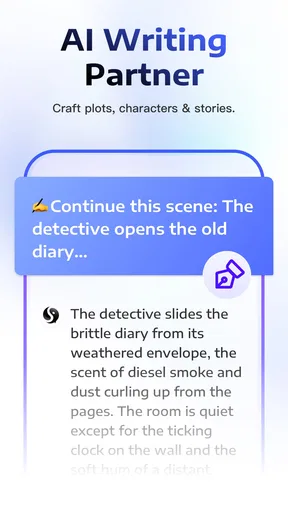
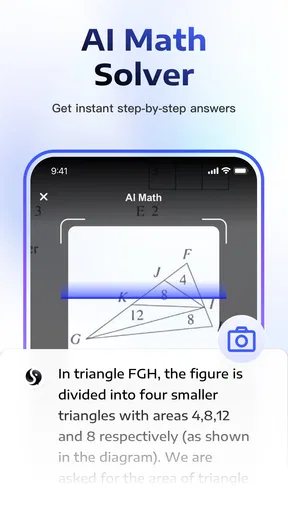

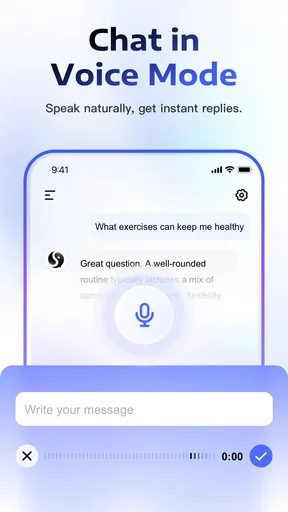
Our Review of Deep Think - AI Seek Chatbot
 Analysis by Appyee
When I want to think through a question out loud, a chatbot can be useful—but only if I treat its answer as a starting point, not an authority. Deep Think - AI Seek Chatbot is a free productivity app from Guru AI Lab that puts conversational AI in a mobile chat interface. It has a 4.7 average from around 54,000 ratings, and more than a million installs, so it has clearly attracted a sizeable audience. Those figures tell me it is widely used; they do not tell me whether an answer is right or whether a particular conversation is private. I’d judge those things separately, and use the app with that distinction in mind.
Using Deep Think with care
I use this section to frame a careful first trial: start with a low-stakes question, notice how the reply handles a follow-up, and decide whether the result is useful before sharing more context. That approach makes it easier to judge the chat on its actual help, while keeping personal details and important decisions in your hands.
Getting started and setting expectations
First things first, downloading and installing the app was a breeze. Just a couple of taps, and I was ready to dive into the world of AI conversations. The interface? Super clean and intuitive. Honestly, even if you’re someone who struggles with tech, you’ll find it pretty straightforward.
The app is free to download, is rated for Everyone, and supports Android 7.0 or later. Its current version is 2.6.3-26022767. I’d still check the in-app purchase details before relying on it as a regular tool: optional purchases range from $6.99 to $99.99 per item. That doesn’t mean a purchase is necessary for casual use, but it is a reason to pause at any payment prompt and decide whether the added value is clear to you.
The central experience is a conversation, not a notebook or a task manager. That distinction matters. I’d reach for it to explore a question, draft a first pass, or get unstuck—not to keep the only copy of an important plan or to manage deadlines. If I need searchable records and predictable organization, a notes app is a better home for the finished material.
What the chat is useful for
Once inside, I was greeted with a friendly chat interface. You know those times when you just have a random question about life, the universe, or maybe even what you should have for dinner? Deep Think has got you covered. It’s designed to handle a variety of topics, so I decided to test its limits.
From philosophical musings to practical advice, this chatbot seemed to have an answer for everything. I asked about the meaning of life (as you do), and it came back with a thoughtful response that made me ponder a bit. Pretty cool, right?
The most useful everyday pattern is to give the chat a small, concrete job. For example, if I have a few ingredients and no plan for dinner, I can list what is on hand and ask for a simple meal idea, then follow up with a constraint such as “keep it vegetarian” or “use one pan.” That back-and-forth is more helpful than asking a vague question and accepting the first response. I’d still check cooking times and food-safety advice against a dependable source.
It can also help me prepare for a task before I start it. I might ask for a plain-language explanation of a term, then request a short list of questions to bring to a meeting. The result is a useful prompt for my own thinking, not a substitute for professional judgement or a verified reference. That is especially important when the subject affects health, money, legal decisions, or personal safety.
Model choice and answer quality
One thing I really appreciated was how natural the conversation felt. It's like chatting with a well-read friend who's always ready with an interesting fact or a new perspective. The AI behind Deep Think is clearly top-notch, capable of understanding context and providing responses that feel genuinely insightful.
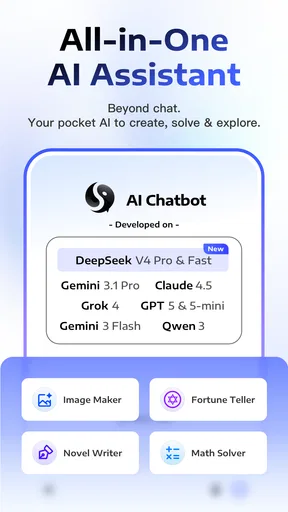
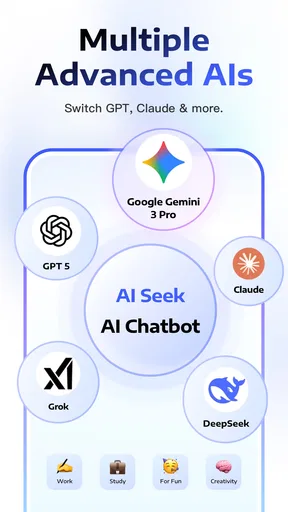
The app’s store summary points to several AI models, including Gemini 3 Pro, Grok, Claude, and DeepSeek-V3.2. Having several named models in one app can be appealing if you like comparing how different systems approach a question. But a list of model names does not guarantee that every option behaves the same way, that every answer is current, or that the answer is correct. I’d treat confidence and fluency as presentation, not proof.
A practical way to use multiple model options—when they are available in the app—is to compare responses on a question where nuance matters, rather than repeatedly asking the same simple fact. If two answers differ, that disagreement is a signal to investigate, not a vote that settles the issue. For an ordinary brainstorming task, one response may be enough; for consequential information, I’d check a trusted source outside the chat.
Compared with a conventional search engine, a chatbot is better at turning a broad request into a conversational explanation or a draft you can refine. Search is usually the stronger choice when I need a source to inspect, current details, or several independent pages. Compared with a dedicated writing or note-taking app, this chat format is more flexible for exploring ideas but less suited to maintaining a polished, organized record. I would use it alongside those tools, not expect it to replace them.
Personalisation and continuity
Another neat feature is its ability to learn from interactions. The more you chat, the better it gets at tailoring responses to your preferences. It’s like having a personal assistant that grows with you.
That kind of convenience is most useful when I make my preferences explicit in the conversation: for example, asking for a concise answer, a beginner-friendly explanation, or a list of options with trade-offs. Clear instructions make a response easier to judge and adjust. I would avoid assuming that a chat will remember a preference reliably across every new conversation unless I can see how that behaviour works in practice.
There is a trade-off here: tailored replies can save effort, while sharing more context can make a prompt more personal. I’d describe the situation in general terms when the details are sensitive. Instead of entering someone’s full name, workplace, or private correspondence, I can summarize the issue and remove identifying details before asking for help with wording or perspective.
Privacy, permissions, and user control
For me, trust with an AI app begins with what I can actually see and control, not with assumptions about the technology behind it. I would review the permissions Android presents during installation or use, and allow only those that make sense for a task I am doing. If a permission request appears unrelated to chatting, I’d stop and consider whether I want to continue before granting it.
I would also look through the app’s visible settings and account choices before sharing anything personal. The useful question is not just whether a chatbot can answer, but whether I understand the controls available for my chats and account. If a control is unclear, I would keep the conversation low-stakes until I know what that choice does. I would not put passwords, payment details, private work documents, or another person’s confidential information into an AI prompt.
A realistic example: on the way home, I might ask for help turning a vague weekend project into a short sequence of steps. That is low-risk and easy to revise. If the same project involved a client’s private information, I would remove names and identifying details, or use an approved work tool instead. The convenience of a quick answer is not worth exposing information I have a duty to protect.
There is also a useful habit for retaining control of the result: copy only the part I need into the tool where I will actually use it, then edit it in my own voice. A chatbot reply can sound polished while still missing a constraint or making an unsupported claim. Treating it as a draft keeps me responsible for the final message, plan, or decision.
Who will get the most from it
If you’re someone who loves to explore new ideas, or if you just enjoy a bit of banter with a chatbot, this app is right up your alley. It's perfect for those moments when you're waiting for your coffee or stuck in a queue. Just pull out your phone and start a conversation.
Moreover, it's a fantastic tool for anyone who's curious or loves learning. The app doesn’t just give you answers; it engages you in a way that makes you want to keep conversing. Honestly, it’s addictive in the best way possible.
I think it suits people who like asking follow-up questions, need help getting past a blank page, or want a quick explanation in conversational language. It is less compelling for someone who mainly needs citations, exact current information, or a structured archive of work. In those cases, a search engine, a specialist reference, or a dedicated productivity tool is a better fit. The best choice depends on whether I need an idea to work with or evidence I can verify.
It is also worth remembering that a fluent chat can encourage overconfidence. I’d be careful about using a polished response as the final word on a complicated topic, especially when a mistake would have real consequences. For casual brainstorming, that limitation is manageable; for high-stakes decisions, it changes the tool I would choose.
What to check before paying or relying on it
Because the app includes in-app purchases, I’d take a moment to understand what a paid option offers before buying. A free download does not mean every capability is free, and the listed purchase range is wide enough that I would not tap through without checking the amount and terms shown at the point of purchase. If I only need occasional brainstorming, I’d first see whether the free experience covers that habit.
I would also test the app with a harmless, specific prompt before making it part of a routine. Ask for a short explanation, then refine it once: does the reply respond to the constraint, or does it drift into generic advice? That small trial reveals more about whether the conversational style suits me than a long, open-ended chat. If the answer is vague, I can narrow the question or decide that another tool is more dependable for the job.
When I need to keep a useful response, I’d save the final version somewhere I control rather than relying on chat history as my sole record. That is a simple safeguard for plans, drafts, and explanations I may need later. For shared or work-related material, I’d follow the rules of the organization involved and avoid putting restricted information into a consumer chatbot.
A measured recommendation
In conclusion, Deep Think - AI Seek Chatbot is more than just an app; it’s a companion for the curious mind. Whether you're seeking knowledge, advice, or just a bit of fun, this AI chatbot is a reliable and engaging companion. Give it a shot, and you might just find yourself hooked on the endless possibilities of AI-driven conversations.
So next time you're in need of a quick chat or some deep thinking, you know where to turn. Happy chatting!
My recommendation is cautious but positive: I’d try it for low-stakes questions, idea generation, and conversational explanations, while keeping sensitive information out and checking important claims elsewhere. Guru AI Lab’s app has a straightforward chat-first appeal, and its mix of model names may interest people who enjoy exploring different AI responses. The right expectation is that it can help me think and draft—not that it can take responsibility for the answer. If that boundary works for you, it is an approachable option to try; if your priority is sourcing, privacy controls you can readily assess, or dependable records, choose a tool built around those needs.
Verdict
Strengths of Deep Think - AI Seek Chatbot
- User-friendly interface for easy navigation.
- Offers real-time responses for quick assistance.
- Supports multiple languages for global users.
- Integrates with various apps for enhanced usability.
- Customizable settings to suit user preferences.
Limitations of Deep Think - AI Seek Chatbot
- Limited free version with in-app purchases.
- Occasional connectivity issues reported.
- Some features require a stable internet connection.
- May struggle with complex queries or nuances.
- Privacy concerns with data storage and usage.
Other Releases by Guru AI Lab
View All
AI Photo Enhancer - Evoke
Photography4.6
Similar Picks in This Category
View All
Google Calendar
Google LLC4.6

Google Drive
Google LLC4.3

Google Assistant
Google LLC3.9

Microsoft OneDrive
Microsoft Corporation4.6

Samsung Calendar
Samsung Electronics Co., Ltd.4.1

Microsoft OneNote: Save Notes
Microsoft Corporation4.6
Frequently Asked Questions
What is Deep Think - AI Seek Chatbot?
Deep Think - AI Seek Chatbot is an advanced artificial intelligence application designed to provide users with insightful conversations and assistance. It leverages machine learning to understand and respond to a wide range of queries, making it a versatile tool for both casual chats and more serious inquiries.
How does Deep Think ensure the privacy of user data?
Deep Think prioritizes user privacy by implementing robust encryption and data protection measures. All conversations are securely stored and not shared with third parties without consent. Users have the option to delete their chat history, ensuring complete control over their personal data.
Can Deep Think - AI Seek Chatbot handle complex questions?
Yes, Deep Think is equipped with a sophisticated AI engine that can process and respond to complex questions. Whether it's providing detailed information on a specific topic or offering nuanced advice, the chatbot is designed to deliver accurate and contextually relevant responses.
Is Deep Think available on both Android and iOS?
Deep Think - AI Seek Chatbot is available for download on both Android and iOS platforms. Users can easily find it on the Google Play Store or Apple App Store, ensuring compatibility with a wide range of devices for seamless user experience.
Are there any subscription fees for using Deep Think?
Deep Think offers a free version with basic features, but also provides a premium subscription for users who want access to advanced capabilities and ad-free interactions. The subscription model is flexible, allowing users to choose a plan that best suits their needs.
